
Signing in with multi-factor authentication (MFA) is now more flexible.
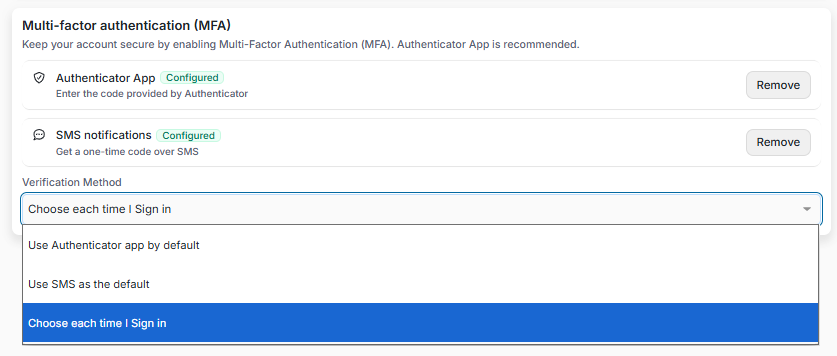
When you have more than one MFA method enabled, such as an Authenticator App and SMS, your Verification Method now automatically switches to "Choose each time I sign in." You can pick the method that is most convenient at that moment.
Why This Matters (Benefits)
More control at sign-in: Choose the verification method that works best for you each time.
Less confusion: FutureVault no longer silently prioritizes the Authenticator App when you have set up more than one method.
Still your choice: You can change your preferred verification method at any time.
What Problem It Solves
Previously, when a user enabled a second MFA method, the Authenticator App was automatically set as the default. Users who expected to choose between their methods at sign-in weren't able to unless they changed the setting manually.
How It Works
One MFA Method
If you have only one MFA method set up, it remains your default verification method.
Two or More MFA Methods
As soon as you enable a second MFA method, your Verification Method automatically changes to "Choose each time I sign in." At sign-in, you'll be asked which method you want to use.
Change Your Preference Anytime
You can still select a specific default verification method from your MFA settings at any time.
Note: Existing accounts are not changed. The new default applies when a second MFA method is enabled.