
We’ve enhanced access management for Head Office Representatives, giving Head Office Admins a centralized view of the Vaults and Portals each Representative can access. From the Representative’s User Details > Access section, Admins can now manage both Head Office Vault access and Portal access without navigating between different areas of the platform.
Why This Matters (Benefits)
As organizations grow across multiple Portals, managing Representative access can become increasingly complex.
This enhancement provides a single location to review and manage access, making administration faster while providing better visibility into where each Head Office Representative has access.
What Problem It Solves
Previously: The Access section of an HO Representative’s profile displayed only Head Office Vaults. Portal-level access had to be managed separately.
Now: Head Office Admins can manage both types of access directly from the Representative’s profile.
How It Works
The Access section now includes two dedicated tabs:
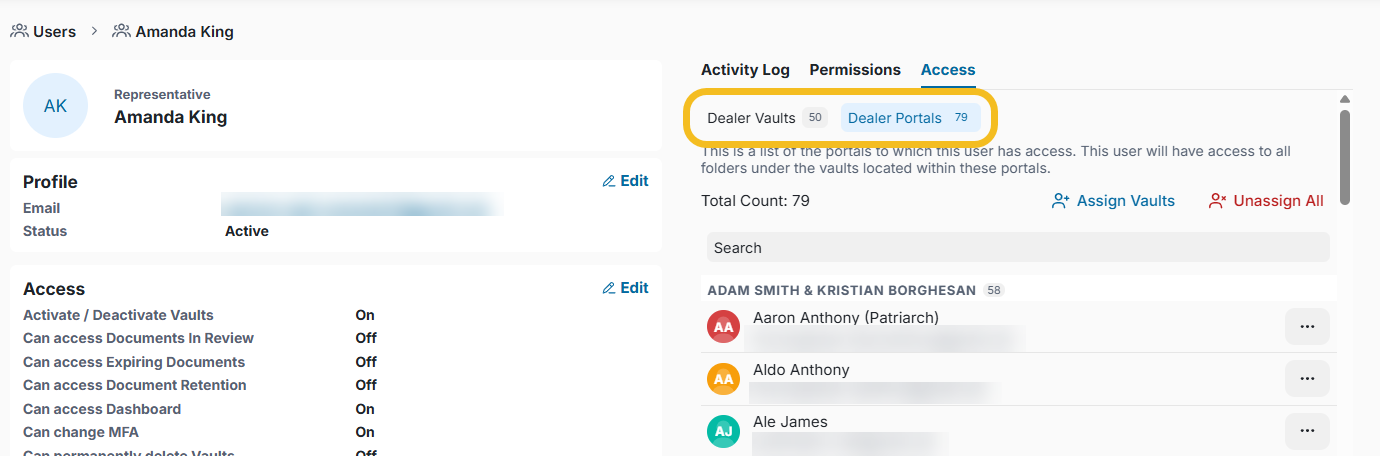
Head Office Vaults
View the Head Office Vaults the Representative can access. Admins can assign or remove Vault access and customize folder permissions, which are applied consistently across these Vaults.
Portals/ Client's Vault
View and manage the Portals/Client's vault assigned to the Representative. From here, Admins can:
Search for a specific Portal.
Assign access to additional Portals.
Unassign all Portals.
Remove existing Portal access.
Open a Portal to view its details.
When you grant Portal access, the Representative gains access to all folders within the Vaults under that Portal.
Important Notes
All access changes are captured in the Activity Logs, providing an audit trail of permission updates.
Adding or removing access does not trigger Bell notifications or email notifications to the Representative or clients.