
Vaults use two folder structures — Fixed and Open — and each folder type within them can be identified by color, logo, or badge. Note that Fixed Folders are commonly referred to as Company Folders in FutureVault language.
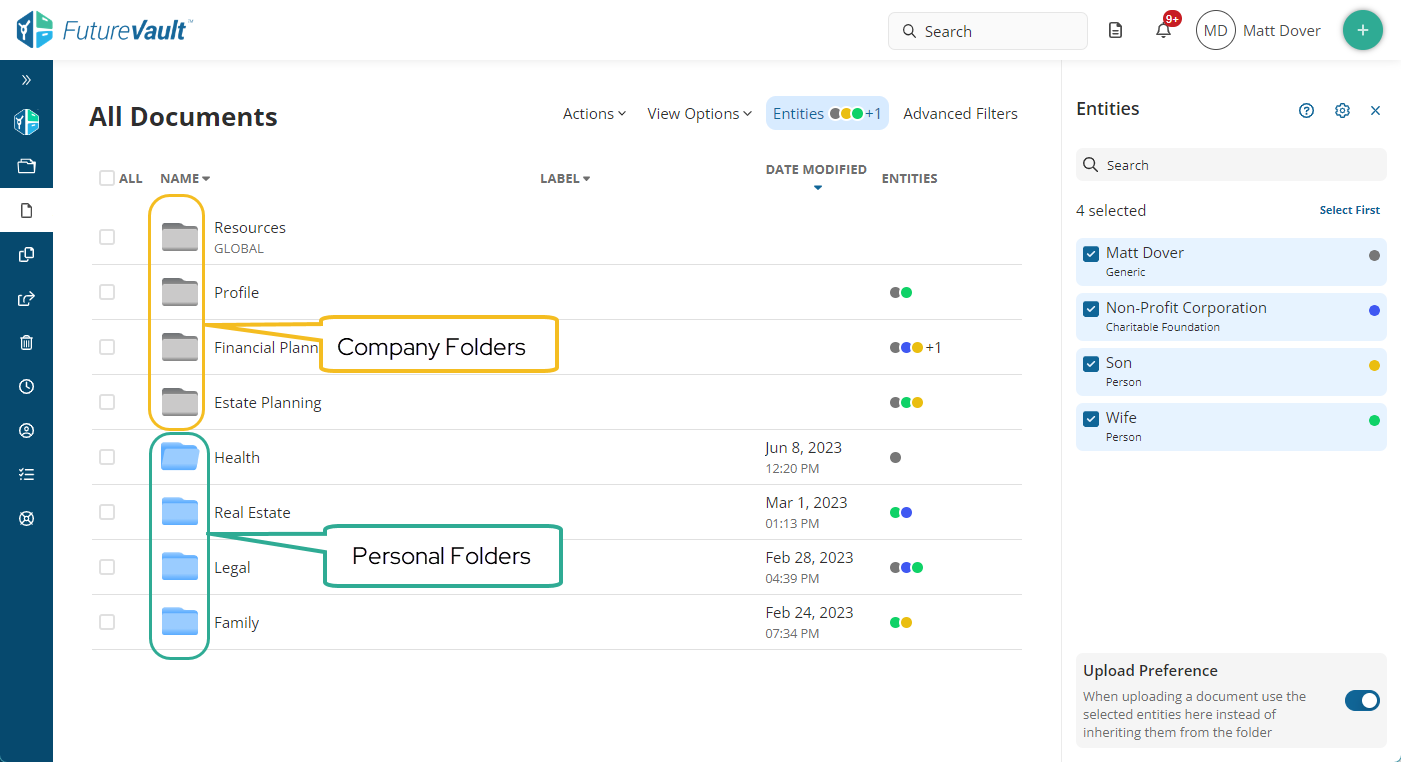
Folder Types
Overview
Taxonomy | Folder Type | Identifier | Vault Package | Who Manages It | Who Has Access |
|---|---|---|---|---|---|
Fixed | Company Folders | Distinct color, optional logo | Essential, Premium, Corporate | Administrative users | Set by the organization |
Fixed | OBA Folders | OBA badge | Essential, Premium, Corporate (3-tier + Head Office approval required) | Advisor (by Head Office approval) | Advisor + Client only |
Fixed | Global Folders | GLOBAL badge | Requires Corporate Vault activation | Administrative users | View/download only, for clients |
Open | Personal Folders | Distinct color (from Company Folders) | Premium, Independent | Vault Owner | Vault Owner + granted collaborators |
The Fixed structure is set by the organization providing the vault; the Open structure lets the vault owner build their own folders.
Fixed Folder Structure
The Fixed structure has a predefined Level 1 (Category) folder, and one or more Level 2 (Sub-category) folders beneath it. Neither level can be created, deleted, or modified by users, and documents cannot be saved directly under a Level 1 folder.
Users can create their own folders under a Level 2 folder — these become Level 3, Level 4, and so on. Once created, only an administrative user can edit or delete these sub-folders.
Any document uploaded into a Fixed-structure folder is automatically added to the vault's default entity.
Company Folders
Company Folders are the custom folder structures a company defines to exchange documents with its clients and collaborators. They are owned and managed by the portal's administrative users.
Identify a Company Folder by:
- A distinct color
- An optional logo in the folder icon
- Ownership by administrative users, not the vault owner
OBA (Other Business Activity) Folders
Identified by an OBA badge. Only available if approved by Head Office.
This folder type lets an Advisor request a fixed OBA Folder within a Client's Vault, visible only to that Advisor and Client. It gives them privacy and lets the Advisor manage Outside Business Activities directly within the vault. Head Office users cannot access these folders.
Global Folders
Identified by a GLOBAL badge.
Global Folders let an organization share standardized material with many recipients in one action. Clients can view and download these documents, but cannot edit or upload to them.
Open Folder Structure
Unlike the Fixed structure, users, clients, and collaborators can create, delete, or modify folders and documents at any level.
This structure is only available on a Premium vault package or an Independent vault.
Personal Folders
Identified in All Documents by a color that differs from Company Folders. Some clients may only have this folder type available to them.
Only the Vault Owner can access these folders by default, though they can grant access to third-party collaborators — family members, trusted advisors, or administrative users.
The Vault Owner starts with a predefined Entity structure and can add or remove Entities within these folders.