
We’ve improved the Documents In Review tab to give users more visibility into documents awaiting review and make it easier to find the files they need.
What’s New
More Document Information at a Glance
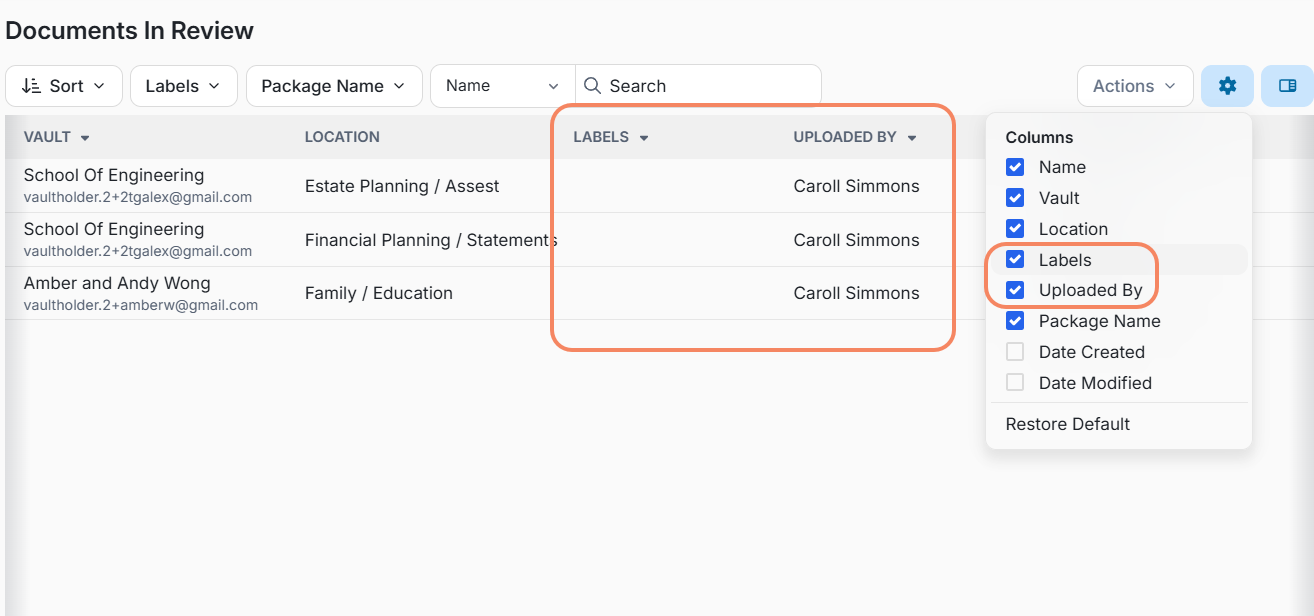
Two additional columns are now available in the Documents In Review table:
- Labels – View any labels associated with a document directly from the table.
- Uploaded By – Quickly identify the user who uploaded the document.
These columns can also be managed through the Columns settings, allowing users to customize the information displayed in their table.
New Filtering Options
Users can now narrow down the documents displayed in the In Review tab using two additional filters:
- Labels – Filter documents based on their assigned labels.
- Uploaded By – Search by the name of the person who uploaded them.
Where supported by the table, the new columns can also be used for sorting, making it easier to organize and review larger sets of documents.
Did You Know?
You can customize the Documents In Review table to better match the information that matters most to you.
Hide or show columns
Click the gear icon in the top-right corner of the table to choose which columns you want to display. Simply select or deselect a column to show or hide it.
Reorganize your columns
You can also change the order of the columns. Drag and move a column to your preferred position to organize the table the way that works best for you.
Your customized view makes it easier to focus on the information you use most when reviewing documents.
Why This Matters
These enhancements provide more context directly within the Documents In Review tab and help users quickly locate, organize, and review documents without having to open individual files.