
Modernized Document Upload Experience
Uploading documents is now faster and more intuitive thanks to several usability enhancements to the Document Upload workflow. The refreshed interface introduces a cleaner, more modern design while reducing unnecessary steps, allowing users to complete uploads with fewer clicks.
The upload flow now intelligently adapts based on your portal configuration and the options available, creating a simpler experience without sacrificing flexibility.
Who This Impacts
- Administrators
- Representatives
Why This Matters
These enhancements streamline one of the platform's most frequently used workflows by:
- Reducing the number of upload steps.
- Keeping users focused within a single screen.
- Automatically skipping unnecessary prompts.
- Making notification timing easier to review and adjust.
- Providing a cleaner, more modern user experience.
What's New
Modern Notification Timing Experience
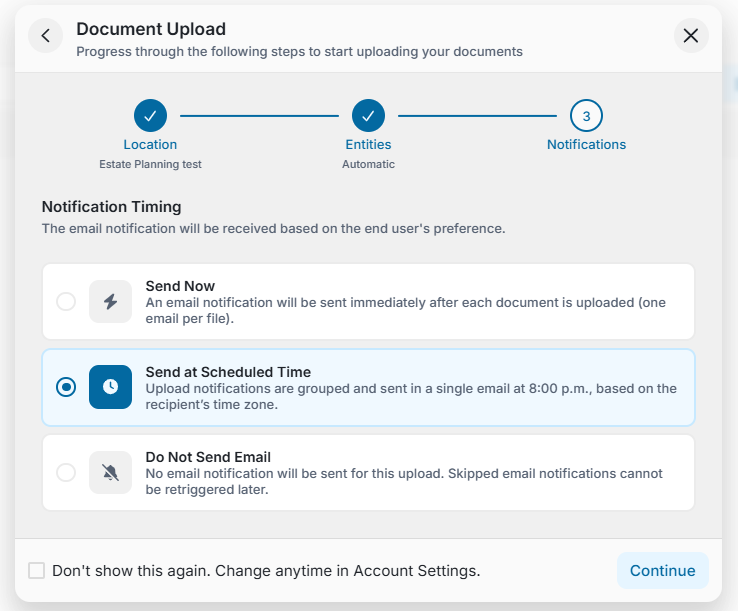
The Notification Timing prompt has been redesigned with a cleaner, step-based interface that is easier to navigate and aligns with the latest FutureVault design standards.
Users can continue to choose whether to:
- Send Now
- Send at Scheduled Time
- Do Not Send Email
The new layout makes each option easier to understand while maintaining the same notification functionality.
Inline Manual Entity Selection
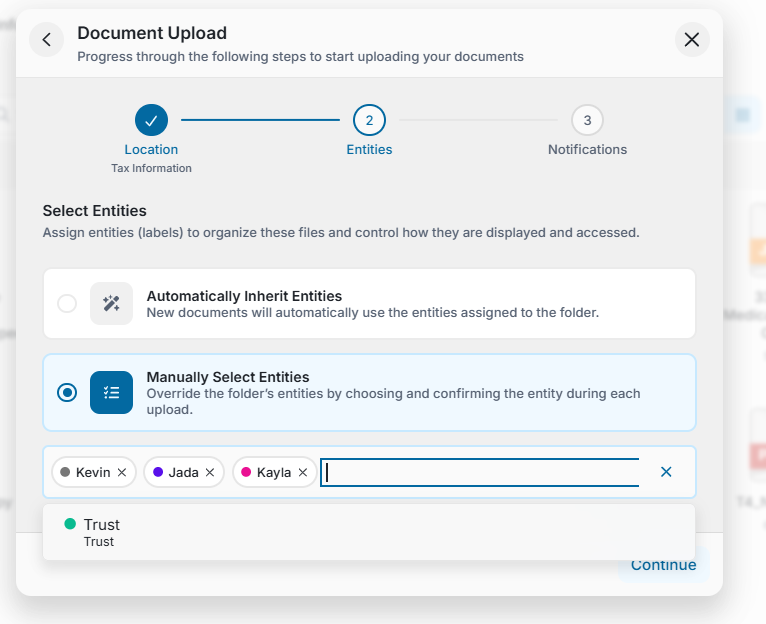
When Manually Select Entities is chosen, entities can now be searched and selected directly within the same upload screen.
Previously, selecting entities required opening a separate window or additional step. Now, users can:
- Search for entities inline.
- Add or remove multiple entities without leaving the current screen.
- Complete the upload workflow faster with fewer interruptions.
Notification Timing Can Be Changed During Entity Selection
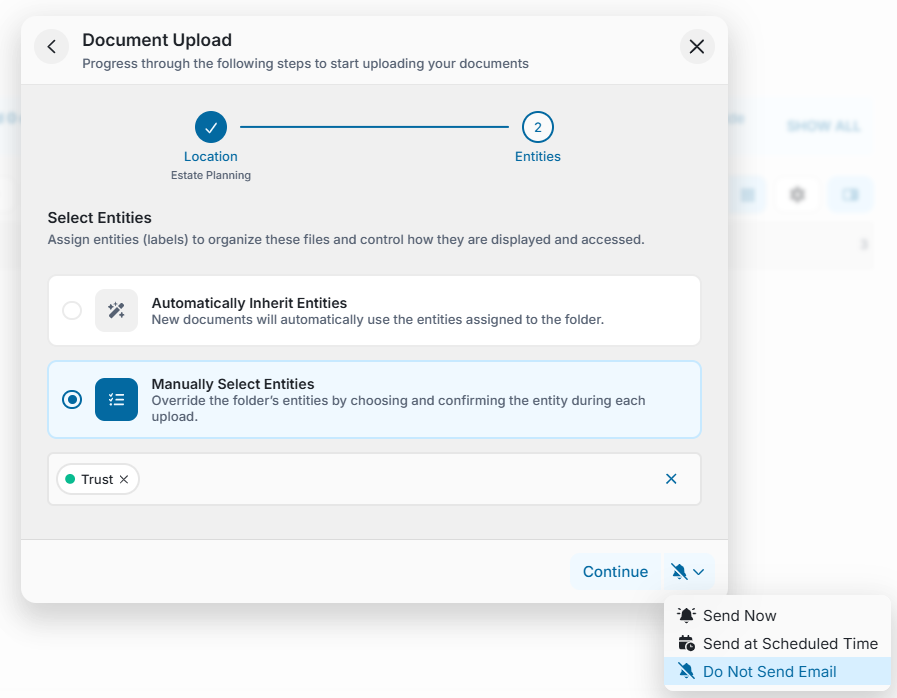
When Entity Management or Manual Entity Selection and the Notification Timing step has been disabled in their personal preferences, users can now adjust their notification timing directly within the upload experience. This provides greater flexibility without requiring users to leave the upload workflow or change their account settings.
Smarter Upload Flow
The upload wizard now intelligently skips unnecessary steps.
For example:
- If only one entity is available for the selected folder, the Entity Selection step is automatically skipped and that entity is applied automatically.
- Users are only prompted when a decision is actually required, resulting in a faster upload experience.
Important Notes
- The Notification Timing step only appears when notification preferences are applicable for the upload.
- Automatic or Manual entity assignment continues to use the user preferences inside a vault.