
We've enhanced tables across the platform to provide a more flexible and user-friendly experience when viewing and managing information. These improvements make it easier to customize your workspace, access large datasets, and find the information you need faster.
Why This Matters (Benefits)
As more information becomes available across the platform, tables can become crowded and difficult to navigate. These enhancements provide greater control over how data is displayed, helping users work more efficiently and focus on the information that matters most.
What Problem It Solves
Previously, tables automatically compressed columns when additional data was displayed, making information difficult to read. Users also had limited ability to personalize table layouts.
With this update, users can customize table views and easily navigate large datasets without sacrificing readability.
How It Works
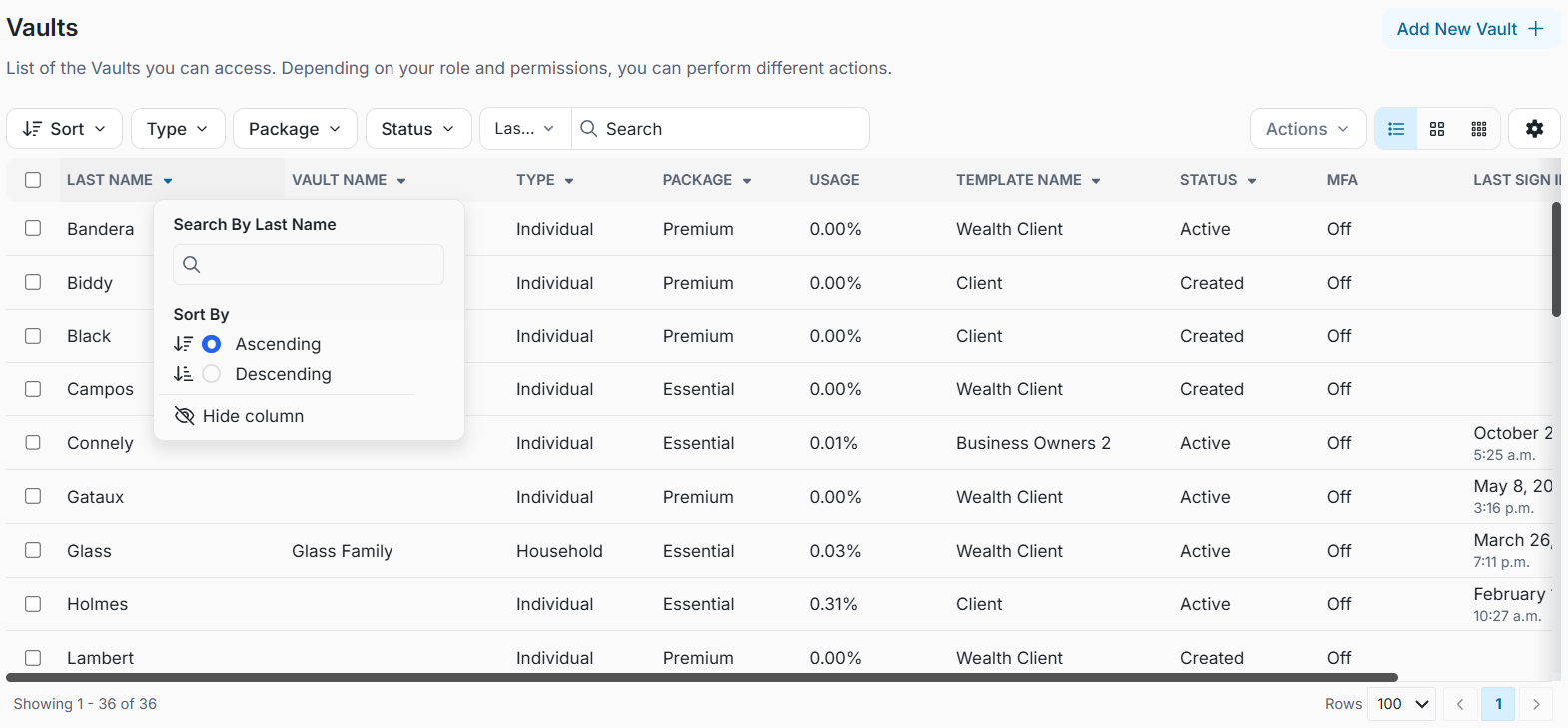
Reorder Columns
Drag and drop columns to organize information in the order that best supports your workflow.
Resize Columns
Adjust column widths to display more or less information as needed.
Show or Hide Columns
Choose which columns are visible, allowing you to focus only on the data relevant to your task.
Horizontal Scrolling
When tables contain more information than can fit on the screen, a horizontal scroll bar will appear. This prevents columns from being compressed and ensures data remains easy to read.
Improved Sorting
Sort information in ascending or descending order directly from column headers for faster navigation and analysis.
Important Notes
- Table preferences may be retained during your session, depending on the page and browser settings.
- Horizontal scrolling automatically appears when additional columns exceed the available screen width.
- These enhancements are available anywhere the new table experience has been enabled.