
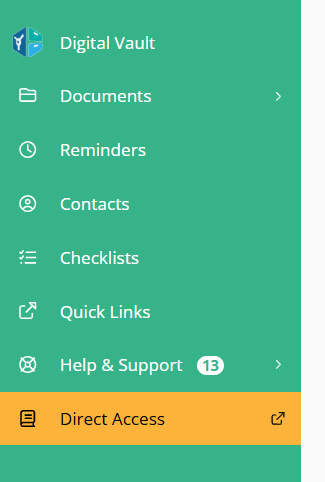
A new vault-level menu enhancement allows up to two permanent links to be added directly to the vault navigation or admin portal. These links provide direct access to external systems or portals and are consistently displayed across all vaults within the portal.
Contact the Customer Success team to learn more!
Why This Matters (Benefits)
Centralizes access to external systems within the vault
Creates consistent navigation across all vaults
Reduces reliance on separate bookmarks or external navigation
Supports enterprise ecosystem integration
Enables tier- and role-based configuration in structured portals
What Problem It Solves
Previously:
Clients and teams had to leave the vault to access related systems.
There was no way to add permanent navigation links within the vault menu.
Existing Quick Links are user-configurable and not standardized across vaults.
There was no structured way to define persistent external access across all vaults.
Now:
Up to two permanent links can be added directly to the vault main menu.
These links are consistently displayed across all vaults in the portal.
They are not user-configurable and cannot be customized per individual vault. This feature is separate from the Quick Links functionality.
This is not an SSO capability — it provides direct access via URL.
How It Works
The organization can choose the label and link to be added permanently to the main menu of vaults and the admin portal, and the visibility can be configured by role.
1️⃣ Vault Menu Links (Client-Side)
Up to two permanent links can be configured.
Links appear in the vault main navigation menu.
Links are consistent across all vaults within the portal.
Visibility can be configured at the portal level (not at the vault level).
These links cannot be edited by end users.
This feature is separate from the Quick Links feature.
2️⃣ Admin Portal Links
In addition:
Up to two internal links can also be configured in the Admin Portal navigation.
For 3-Tier portals:
Links can differ by vault tier
Links can differ by roles inside each tier (Admin vs Representative)