
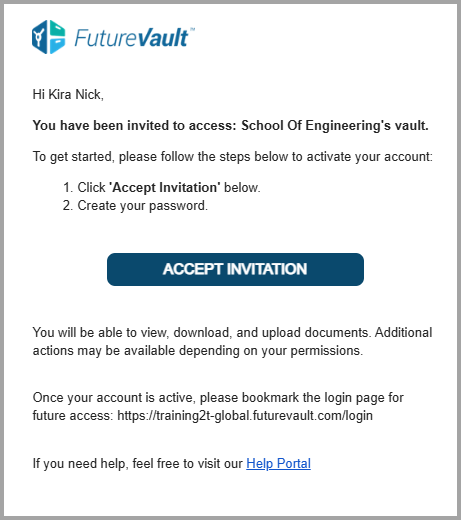
We’ve updated the collaborator invitation email to improve clarity, accuracy, and onboarding guidance across all portal types. This enhancement ensures collaborators clearly understand their role, the vault they’ve been invited to, and the proper steps to activate and access their account.
Why This Matters (Benefits)
Removes incorrect role labelling in invitation emails
Clarifies which vault the user has been invited to
Reduces confusion during first-time activation
Prevents users from attempting to log in before accepting the invitation
Decreases onboarding-related support tickets
What Problem It Solves
Previously:
Invitation emails referred to all invitees as “Trusted Advisor,” even when they were Clients or Family Members.
Collaborators were unclear about where to log in after activating their accounts.
The Vault Owner was automatically CC’d, making it appear as though they personally initiated the invitation.
Now:
The invitation email uses neutral, accurate role language.
The message clearly states the recipient has been invited to a specific vault.
The Vault Owner is no longer presented in a way that suggests manual sending.
A new paragraph instructs users to bookmark the login page after activation.
The login URL (
{{PortalURL}}) is displayed as plain text (no hyperlink) to ensure users first click Accept Invitation before attempting to log in.